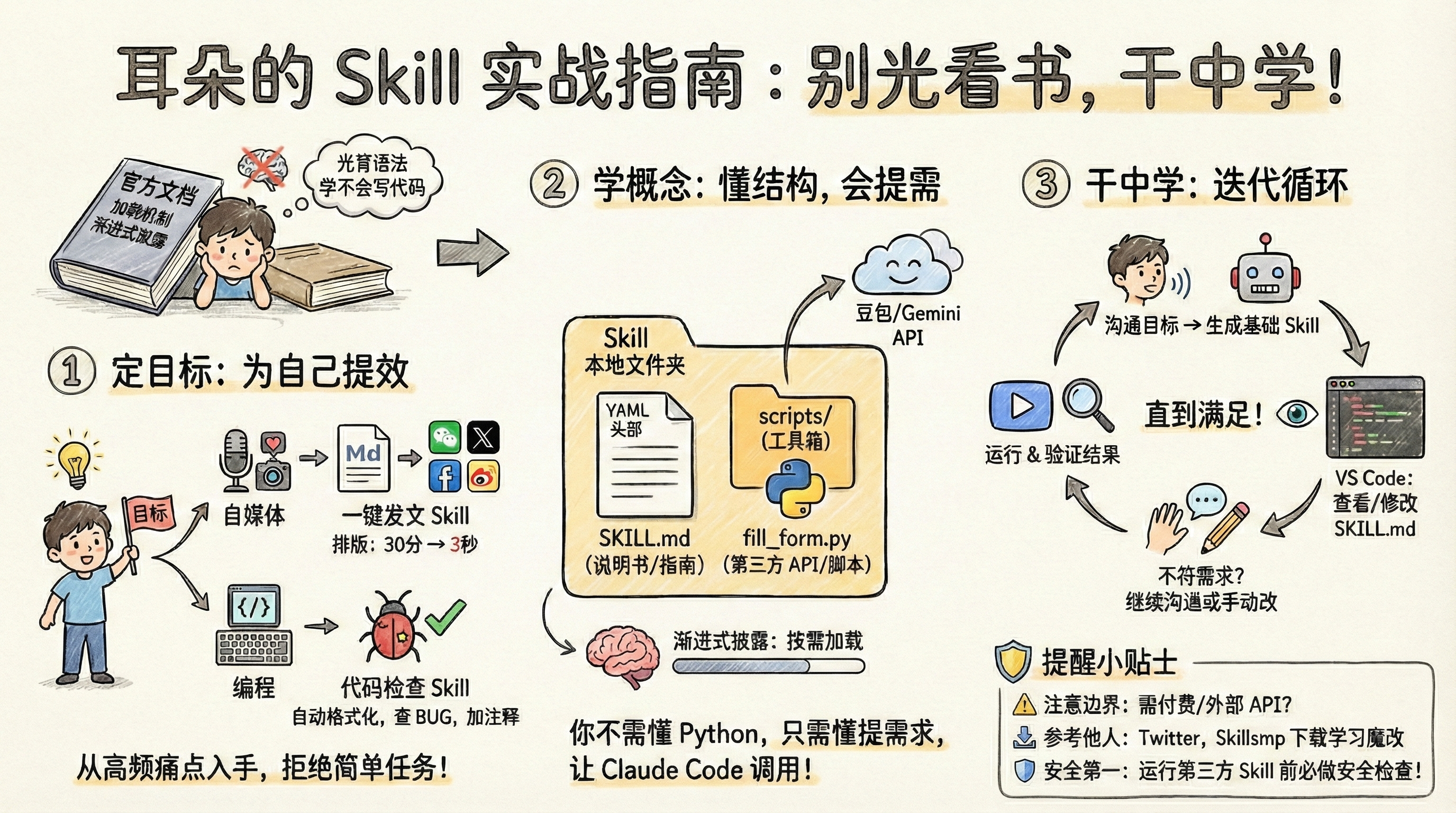
Stop Memorizing Skill Docs — Start Building
Stop grinding through official Skill documentation and start building. Learn by doing.
Official docs throw around concepts like “loading mechanisms” and “progressive disclosure” — like a programming book that only teaches syntax. Memorizing syntax will never teach you to code.
Learning anything requires purpose. Without a goal, you cannot measure your progress. So the first step in learning Skill is: set a target for yourself.
1. Set a Goal
Pick something that can genuinely improve your productivity, and it should not be too simple.
If a task can be completed with a single sentence to Claude Code, it does not need to be a Skill.
Start from frequent, repetitive tasks that frustrate you — build an automation Skill that actually saves you time.
For content creators: build a one-click publishing Skill that converts Markdown to platform-specific rich text (like Medium or Substack), auto-generates images, and styles headings — compress 30 minutes of formatting work into 3 seconds.
For developers: create a Skill that checks all your code formatting, catches common bugs, adds key comments, and removes compatibility code automatically.
When using any publicly available Skill, you should always fine-tune it. Only you know what result you are actually aiming for.
Everyone has their own needed Skill. The first thing to do when learning a tool is: improve your own productivity.
2. Understand the Concepts
The official Skill docs are lengthy, but there are only two core concepts: File System Abstraction and Progressive Disclosure.
File System Abstraction means: a Skill is stored as a local folder.
Progressive Disclosure means: it is not loaded into the Agent context all at once. Instead, when needed, the entire skill.md file is automatically loaded.
These concepts do not matter much for small projects. The point of building Skills is to use them — many people simply trigger Skills manually.
Of course, you need to understand the basic Skill structure. A Skill is a folder, with skill.md as the core file, which must include a YAML frontmatter (name, description).
Unlike traditional Prompts, a Skill can carry additional resources in its folder — typically scripts and reference materials. Example structure:
pdf-skill/
├── skill.md          (main instructions)
├── form-guide.md     (form filling guide)
├── api-reference.md  (detailed API reference)
└── scripts/
    └── fill_form.py  (utility script)
A Skill is more like teaching Claude how to work. skill.md is the complete manual, while the scripts folder is the toolbox, containing Python scripts to use.
api-reference.md can hold more detailed documentation. You can directly instruct in skill.md: in scenario X, call the fill_form.py script from the scripts folder for Claude to execute.
What are scripts for? Anything third-party can be run through Python scripts.
For example, if you need auto-generated images for your articles, you would call a third-party image generation API (like DALL-E or Gemini Image) — all within a Python program.
Your Skill can then specify using the corresponding program for image generation. Claude Code will automatically call your Python script and produce the image.
You do not need to know Python syntax — just know how to describe requirements. Clearly state what you want done, and let Claude Code handle the code writing, API calls — everything else.
Our goal is always to accomplish something, not to learn technical details.
3. Learn by Doing
Once you have set your goal and understood the concepts, just start building.
First, communicate your goal to Claude Code and ask it to create a basic Skill for you.
It will generate the folder structure and scripts. Open a text editor like VS Code and see what it wrote in skill.md.
If it does not meet your needs, keep iterating with Claude Code, or edit the file yourself. As I said, skill.md is just an operational guide — it describes everything you want done and the workflow.
Then tell Claude Code: run the Skill named xxx.
Watch its execution and output. If it does not meet requirements, ask the AI to iterate further, then verify again until it satisfies your needs.
4. Some Reminders
Before building any Skill, communicate with Claude Code about its limitations — check if the requirement is feasible.
For example, building a research report Skill: the first step is web search. If you do not have a paid Claude Code account (search requires paid tier), do not force the AI to fabricate results. Either manually feed PDFs or integrate a third-party search API (like Serper) for the Skill to call.
If you want to learn a Skill, you can download it with Claude Code and ask it to explain, or add your own features on top.
Once downloaded, Skills persist locally as folders and files — modify them however you like.
Many developers share their Skills on X/Twitter. Just copy the link and tell Claude Code: download this for me.
There is also a site aggregating 50,000+ Skills: Skillsmp — check there before building from scratch.
Remember: after downloading any third-party Skill, do not run it immediately. Have Claude Code perform a security check first to see if there are any suspicious or malicious files.