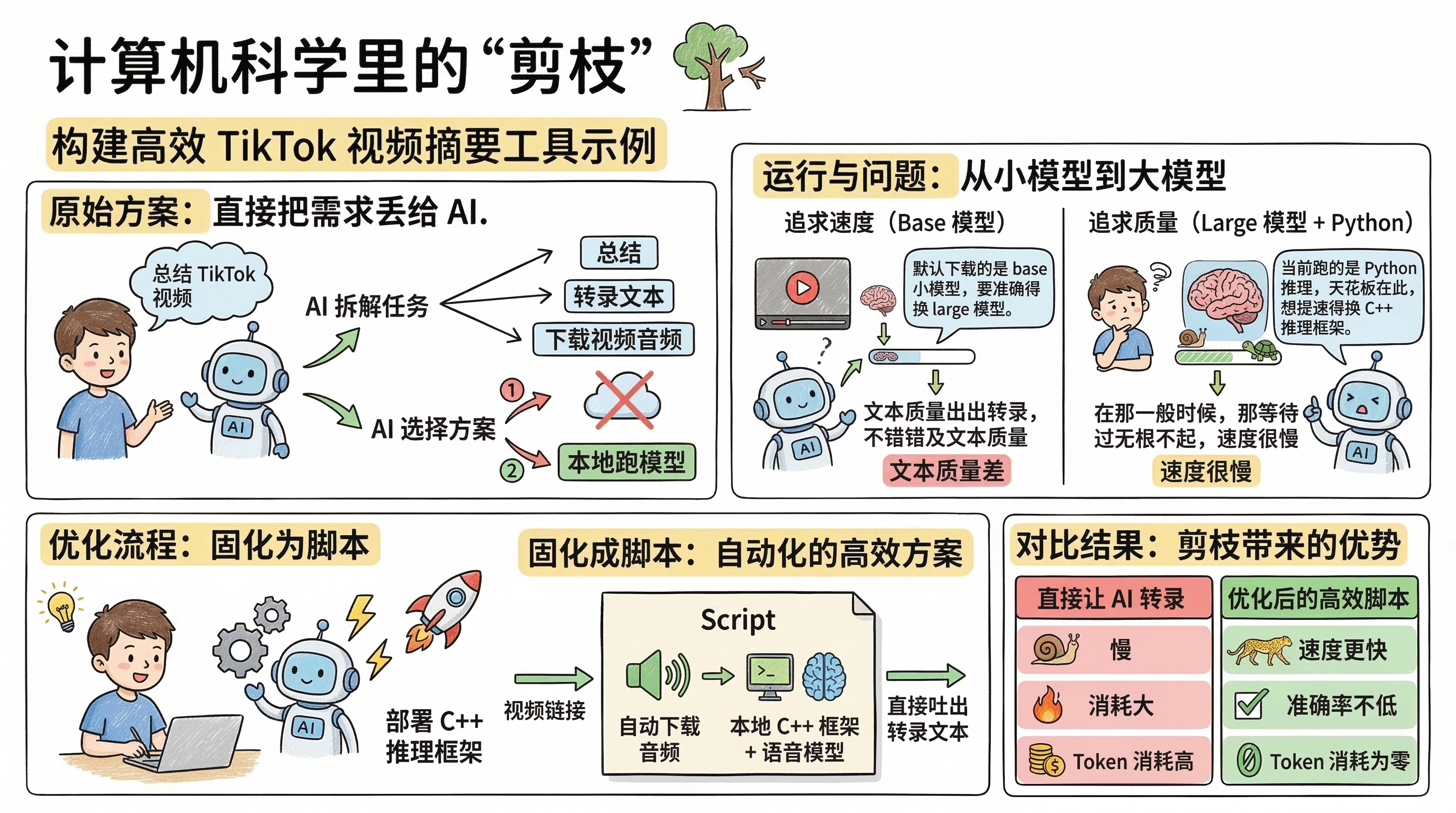
Optimizing AI Workflows with “Pruning” Thinking
In computer science, this is called pruning.
Here’s a concrete example: suppose you want to build a TikTok video summarization tool.
Step 1: Let AI Break Down the Task
Simply provide your requirements to AI, and it will decompose the task on its own: to summarize a video, you first need to get the text; to get the text, you must download the video audio and transcribe it.
At this point, AI presents you with two options:
- Download the audio, then feed it directly to a cloud model for transcription;
- Download the audio, then run a local model for transcription.
AI chose option two—it automatically downloaded a speech-to-text model locally, fetched the TikTok audio through an API, and completed the transcription.
Step 2: Discover Problems, Optimize Gradually
With fast internet, the whole process runs smoothly, but you’ll notice the transcription quality is subpar.
You ask: Why is the quality so poor?
AI: Because it downloaded the base model by default. For better accuracy, you need the large model.
You download the large model and rerun—quality improves, but speed becomes sluggish.
You ask: My machine is this powerful, why is it still so slow?
AI: Because it’s currently running Python inference, and that’s the performance bottleneck. To speed up, you need to switch to a C++ inference framework.
Following AI’s guidance, you redeploy a C++ inference framework, and speed finally takes off.
Step 3: Finalize the Process
Finally, you lock in the entire workflow as a script: just input a video link, and it automatically downloads the audio, invokes the local C++ inference framework with the speech model, and outputs the transcribed text directly.
The Value of Pruning
Now compare it with “direct AI transcription”:
| Approach | Speed | Accuracy | Token Consumption |
|---|---|---|---|
| Direct AI Transcription | Slow | Model-dependent | High |
| Local C++ Inference + Speech Model | Fast | On par with AI | Zero |
You’ll find that using AI directly is both slow and resource-intensive, while locking in the second workflow as a script gives you faster speed, comparable accuracy, and zero token consumption.
The essence of pruning is: replace the steps where AI underperforms or costs too much with more suitable tools, only invoking AI at the steps that truly require intelligence. This follows the same principle as “why different people’s Skills turn out so differently”—first do the technical solution research, then let AI execute.