I Never Come Up with Prompts for Image Generation
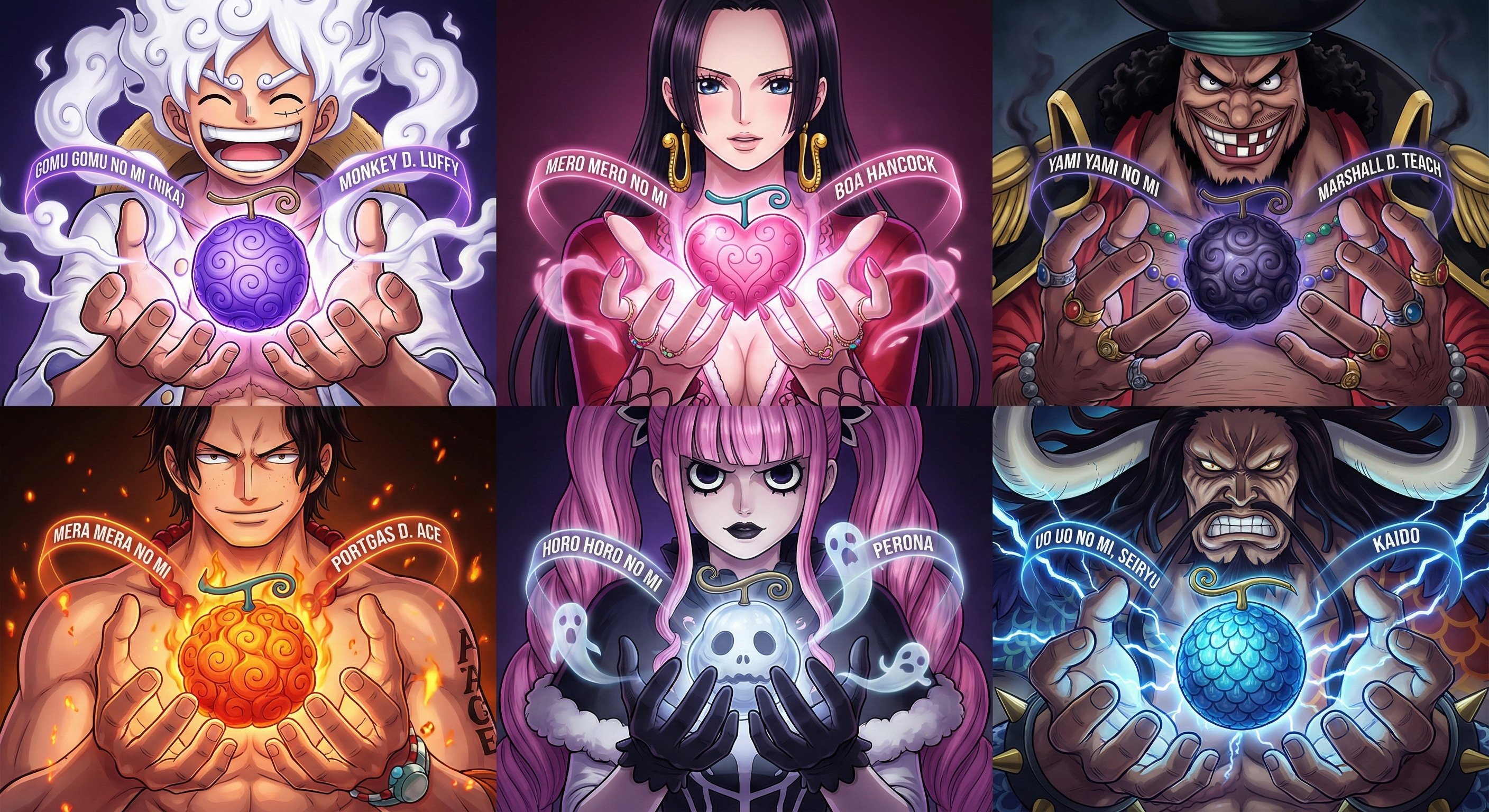
Like this image here — I wanted to create a Devil Fruit (恶魔果实, the unique power-granting fruits from One Piece) illustrated guide from the anime series One Piece.
I would just tell Gemini: “You are a top-tier UI designer for One Piece. Now I need you to design an illustrated guide showing the Devil Fruits of Luffy, Boa Hancock, Black Beard, Ace, Perona, and Kaido.”
Those words “top-tier UI designer” are the key — you have to include them. They’re mainly there to raise the aesthetic standards of the planning, and then Gemini gives me a text-based plan.
Even from just the text plan, we can spot problems. For instance, in my first version, I noticed it had no character portraits, so I had Gemini add those.
Workflow
Once I’ve approved the text plan, I have Gemini generate the prompts directly. And I always add these words: “optimized for Gemini’s image generation model.”
Gemini will then give you a prompt. Open up a new Chat and try it — the first version rarely looks right.
Like with my Devil Fruit guide: the initial result had no hands holding the Devil Fruit. After seeing it and thinking it looked off, I went back to the original Chat and asked Gemini to add the effect of hands holding up the Devil Fruit, then had it regenerate the prompt. Then I’d test the image again, repeating this over and over.
Why It Works So Well
I never describe the exact effect I want in detail. I just tell it what elements must appear in the image.
Because the premise we set from the start is: “You are a top-tier UI designer.” So it figures out how to design those elements into the image, and it usually does a better job than I would.
Like with my Devil Fruit guide — I asked it to include the Devil Fruit names and their owners’ names.
It came up with this clever halo strap design for each character: the Devil Fruit name on the left side of the strap, the character name on the right. If I’d designed it myself, I never would have thought of that, because I’m not a designer by training.
That’s also why my prompts end up much shorter than many bloggers’ for the same results, yet achieve better consistency.
Because the prompts I have Gemini generate are specifically optimized for Gemini.
For my illustrated guide, I only needed to request three revisions from Gemini to nail it.