
The Four Elements of AI Agents
I was surprised to see people on my timeline referring to Doubao, Qwen, and Claude as Agents.
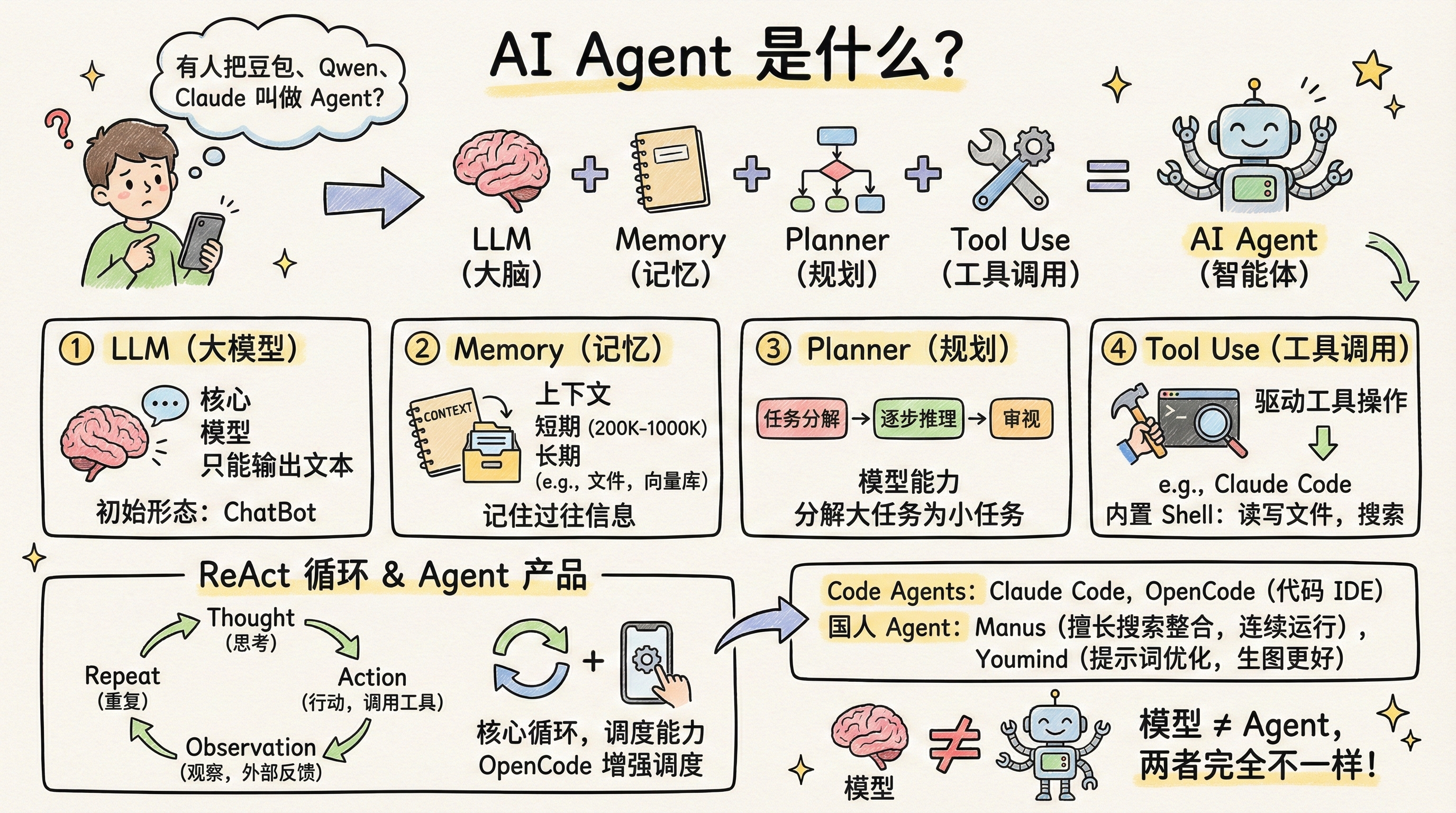
I’ve mentioned in previous posts what an Agent actually is: LLM (brain) + Memory (long-term/short-term) + Planner + Tool Use = AI Agent.
If something meets this definition, it’s an Agent.
The most common Code Agents on Twitter/X are: Claude Code and the recently hot OpenCode.
The most popular Chinese Agent products are: Manus and Youmind.
Let’s break down each component of this definition.
LLM
LLM stands for Large Language Model — the core of everything. When we talk about Claude, Gemini, ChatGPT, or Qwen, we’re talking about models. Models provide the intelligence that enables outputs like code or documents.
But remember: it only outputs. It can’t do anything independently. That’s why the initial form of a large language model is a chatbot — it can only answer questions.
Memory
The most basic form of Memory is context, which every LLM provides natively. Most models currently offer a 200K context window, with Gemini reaching 1000K.
Context is short-term memory — it disappears when the session ends. However, there are many ways to implement long-term memory. The most common is Claude.md — persisting context through files.
There are other approaches, such as vector databases and graph databases. There are also many open-source projects on Twitter/X working in this space.
In short, Memory enables the model to remember past interactions with you.
Planner
Planning is also entirely dependent on model capability, and it relies heavily on prompts. Every model has some planning ability — essentially, the model starts reasoning. More powerful models engage in step-by-step reasoning, pausing after each step to review before continuing.
The importance of planning lies in task decomposition — breaking large tasks into smaller ones for step-by-step processing. For example, if you want to build a webpage, it can be decomposed into: initializing a React/Vue framework, then filling in the corresponding HTML+CSS.
Tool Use
Tool calling is the critical capability that transforms a Large Language Model into an Agent. As mentioned, LLMs only output text. When you provide them with tools, they can invoke those tools to perform operations.
Here’s an example from Claude Code: when it was launched as a code-writing Agent, its built-in tool list is shown below.
When Claude Code was first released, its built-in tools were all Shell tools — primarily file read/write and text search.
By calling just these tools, Claude Code became the best at exploring codebases at the time — with the tradeoff being massive token usage.
When you ask Claude Code to help with a task, you can see it calling tools extensively. For file operations, a 1000-line file is read 200 lines at a time in a loop.
When you ask it to debug an issue, the first tool it calls is the search tool — all Shell tools.
ReAct
Now, everyone knows there are many AI IDEs: Claude Code, Cursor, Trae, Google Antigravity. They can all use the Claude model, yet their results vary dramatically — for instance, most people find Trae not as effective as directly using Claude Code.
The reason is that an Agent needs to flexibly coordinate the four components above. It needs to use the LLM to evaluate code generation quality, assess whether task decomposition has issues, handle tool call errors, and more.
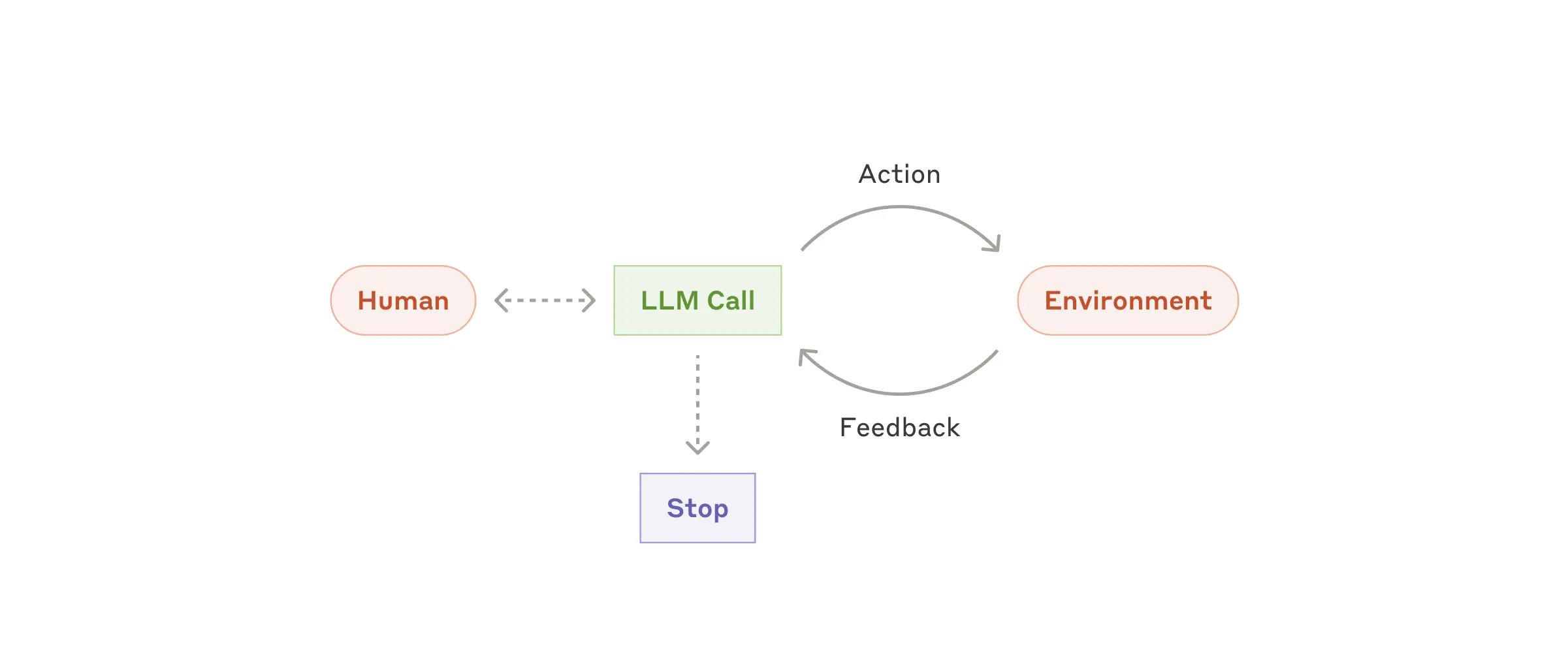
This gave rise to Agent design patterns, with ReAct being the most fundamental. Its core is a loop that repeats continuously, typically with these steps:
- Thought: The model analyzes the current task and decides what to do next.
- Action: The model decides which tool to call (e.g., Google Search, Read, Write) and what parameters to pass.
- Observation: The model pauses here, waiting for the external environment (code/API) to execute the tool, then feeds the execution result back as text to the model.
- Repeat: The model begins a new round of Thought based on the Observation results.
If this loop isn’t well-implemented, the model’s exhibited capabilities will differ vastly — which explains why OpenCode has been so hot recently. It enhanced the original Agent by combining the strengths of multiple models for the Agent to leverage.
Agent Products
Finally, let’s discuss Agent products. Currently, all Code IDEs are Agent products because they possess all the capabilities above, with prompts and Context Engineering specifically designed for code writing. I remember when Cursor first launched, many people reverse-engineered its prompts because of how effective it was.
Adjusting an Agent’s focus turns it into a product — like Manus.
Manus excels at search and synthesis. It can search multiple data sources internally, filter and aggregate results, then deliver a summary. If you need data from Xiaohongshu, it searches Xinbang. For current events, it searches news sites. It can also run continuously for extended periods to complete your tasks (the Loop mentioned above).
All of this comes from the founder rebuilding the Agent’s focus according to their product’s positioning — beyond Agent design, there’s also prompt optimization.
For example, Youmind invested heavily in prompt optimization, which is why many Twitter users say image generation works better on Youmind with the same prompts. Under the hood, they all use the Nano Banana model.
There are also tool differences. Ask Doubao the same research question, and it can’t perform Google searches, so its summaries are mostly useless.
But with Gemini, it can call Google for web-wide searches. Access to high-quality internal information sources is also an Agent’s moat.
Finally, let’s return to the original question:
Model is model, Agent is Agent — the two should never be conflated.